Claude Code: Features, Pricing and AI Development Guide
Claude Code is Anthropic’s agentic coding assistant. Available in the terminal, IDE, desktop app, browser and phone, it finds relevant files, edits projects, runs commands and tests, and requests approval according to your settings. Anthropic introduced a research preview in February 2025 and made it generally available that May.
In February 2026, Anthropic reported annualised run-rate revenue above 2.5 billion dollars for Claude Code. It also cited SemiAnalysis’s estimate that the tool authored roughly 4% of public GitHub commits. This guide covers its 2026 capabilities, installation, costs, comparisons, GDPR considerations and situations where it is unsuitable.
Claude Code at a glance
| Topic | Status (checked 17 September 2026) |
|---|---|
| Developer | Anthropic |
| Type | Agentic AI coding assistant |
| Where it runs | Terminal (CLI), VS Code, JetBrains, desktop app, web (claude.ai/code), iOS and Android, Slack, GitHub Actions, GitLab CI/CD |
| Models | Claude Opus 5, Sonnet 5, Haiku 4.5 and Fable 5.1 |
| Context window | Up to 1 million tokens, depending on model and plan (Haiku 4.5: 200k) |
| Price | From 20 dollars per month (Pro), or pay per token via the API |
| Install | Native installer for macOS, Linux and Windows (commands below) |
| Certifications (Anthropic) | SOC 2 Type II, ISO 27001:2022, ISO/IEC 42001:2023, HIPAA-ready configuration |
What is Claude Code and how does it work?
Claude Code is an agentic AI tool. Give it a goal such as “fix the failing login test” and it plans the work, reads relevant files, makes changes, runs tests and reports the result. Developers use it for features, bug fixes, tests, refactoring, Git operations and DevOps automation.
It can run locally, in Anthropic’s cloud or in a self-hosted environment. Prompts and relevant code travel over an encrypted connection to a Claude model. Its interfaces include:
- Terminal: the original and most complete CLI interface.
- IDE: native VS Code and JetBrains extensions; the VS Code extension also works in Cursor.
- Desktop: a Code tab in the Claude app for macOS, Windows and Linux beta.
- Web and mobile: cloud sessions at claude.ai/code and in the iOS and Android apps, available since October 2025 and running in isolated sandboxes.
- Automation: Slack, GitHub Actions, GitLab CI/CD, automated review and the Claude Agent SDK. Platforms such as Coder can run it in remote development workspaces.
Why Claude Code matters to modern development teams
Autocomplete helps with individual lines. Claude Code goes further by planning work, running tests and resolving failures through workflows spanning a repository.
Google’s 2025 DORA report found that 90% of surveyed software professionals use AI, and more than 80% report improved productivity. Google describes 65% as relying heavily on AI: 37% a moderate amount, 20% a lot and 8% a great deal. Confidence is less widespread: 30% trust AI output only a little or not at all.
Claude Code features in 2026
These are the principal capabilities described in the source. Availability varies by interface and plan.
| Feature | What it does |
|---|---|
| Plan mode | Claude researches and proposes a plan before touching any file |
| Permission modes and auto mode | Control what runs without asking. In auto mode a classifier reviews actions instead of you; it is the built-in starting mode on Pro, Max and Team, and admins can change it |
| Checkpoints and rewind | Roll back code and conversation to an earlier point |
| Subagents and agent teams | Delegate subtasks to specialised agents with their own context |
| Skills | Reusable instructions and scripts Claude loads when a task calls for them |
| Plugins and marketplaces | Share bundles of commands, subagents, hooks and MCP servers across a team (since October 2025) |
| Hooks | Run your own scripts before or after actions, for example linting or blocking risky commands |
| MCP integrations | Connect Claude Code to ticketing, databases, logs, design tools and internal systems |
| Sandboxing | Isolate the file system and network for commands Claude runs, which Anthropic reports reduced permission prompts by 84% in its own usage |
| Background tasks and routines | Run long jobs in the background or on a schedule in the cloud |
| CLAUDE.md and memory | Project instructions and conventions Claude reads at the start of each session |
How to use Claude Code: getting started
Installation and initial setup
The recommended native installer does not require Node.js and updates automatically.
# macOS, Linux and WSL
curl -fsSL https://claude.ai/install.sh | bash
# Windows PowerShell
irm https://claude.ai/install.ps1 | iex
Other options include Homebrew (brew install --cask claude-code), WinGet (winget install Anthropic.ClaudeCode) and npm (npm install -g @anthropic-ai/claude-code). The source specifies Node.js 22 or newer for npm. Homebrew and WinGet installations do not update automatically. Supported systems include macOS 13+, Windows 10 1809+ and common Linux distributions with at least 4 GB RAM.
Access requires a paid Claude plan, Pro, Max, Team or Enterprise, or a Claude Console account with API credits. The source excludes the free plan. On first launch, claude opens browser-based authentication and stores credentials locally, which should fit your organisation’s credential policies.
Making your first Claude Code request
# Go to your project and start a session
cd /path/to/your/project
claude

# Ask in plain language
> Analyze this React component and identify performance bottlenecks
Claude reads relevant files, presents proposed changes as diffs and applies them within the selected permission mode. Begin with low-risk requests such as “explain the structure of this project” before asking for larger changes. /init creates a CLAUDE.md containing project conventions, helping improve results.
Deployment options: can you run Claude Code on-premise?
Not completely. The application can run on your machines, in Anthropic’s cloud or in a self-hosted environment, but model inference still requires Anthropic, a supported cloud provider or a gateway connected to them. No fully on-premise or air-gapped Claude model is available. The closest options are:
| Option | Where the model runs | Best for |
|---|---|---|
| Claude plans (Pro, Max, Team, Enterprise) | Anthropic | Individuals and most teams |
| Claude Console (API) | Anthropic | Pay-per-use, automation |
| Amazon Bedrock / Claude Platform on AWS | AWS | Organisations standardised on AWS |
| Google Cloud’s Agent Platform (successor to Vertex AI) | Google Cloud | Organisations on Google Cloud |
| Microsoft Foundry | Azure | Organisations on Microsoft Azure |
| Self-hosted environments (public beta, Team and Enterprise) | Cloud sessions run on your compute; inference only via the Anthropic API; not available with zero data retention | Keeping checkouts, builds and secrets on your own infrastructure |
The standard CLI needs a supported operating system, 4 GB RAM and network access to the model provider. An optional gateway or proxy provides central control. For models running entirely on your own hardware, consider self-hosted open-weight LLMs.
Claude Code vs GitHub Copilot vs Cursor vs Codex
All major tools now offer agents. Their differences concern workflow and ecosystem.
| Claude Code | GitHub Copilot | Cursor | OpenAI Codex | |
|---|---|---|---|---|
| Starting point | Terminal-first agent, also IDE, desktop and web | IDE assistant with agent mode, cloud agent and CLI | AI-native code editor (VS Code fork) with cloud agents | CLI, IDE extension, cloud and desktop agent |
| Models | Claude only | Choice of Anthropic, OpenAI, Google and xAI models | Choice of frontier models plus own models | OpenAI GPT models |
| Typical fit | Multi-step tasks across a codebase, terminal workflows, custom agent setups | Teams standardised on GitHub that want model choice | Developers who want an AI-first editor | Teams already on ChatGPT |
| Entry price (individual) | 20 dollars per month (Pro) | 10 dollars per month (Pro), free tier available | 20 dollars per month (Pro), free tier available | Included in all ChatGPT plans, including Free and Go; Plus 20 dollars per month |
| Business price | Team from 25 dollars per seat per month | Business 19, Enterprise 39 dollars per seat | Teams from 40 dollars per user per month | ChatGPT Business, 25 dollars per user per month (20 billed annually) |
These monthly list prices were checked by the source on 17 September 2026. Google moved free, Google AI Pro and Ultra users from Gemini CLI to Antigravity CLI in June 2026; enterprise licences and paid API keys retain Gemini CLI. For fully on-premise or air-gapped use, Tabnine offers an option from 39 dollars per user monthly on an annual subscription.
Choose Claude Code for substantial autonomous tasks, terminal work or custom agents. GitHub Copilot suits organisations built around GitHub and Microsoft that want model choice under one contract. Cursor suits developers seeking an AI-first editor. Combining tools is common: Claude Code also works inside Cursor and VS Code.
When to use Claude Code
Software development and engineering teams
Claude Code is particularly useful for changes across many files: end-to-end features, refactoring, writing and fixing tests, framework migrations and debugging from stack traces. It also handles commits, branches, merge conflicts and pull requests.
Data science and data engineering
Data teams use it to move notebook experiments into production pipelines, write SQL and dbt models, and build internal visualisation apps without extensive front-end expertise.
DevOps and infrastructure automation
Infrastructure work includes configuration, CI/CD, Terraform and Kubernetes troubleshooting. Command execution and log access help diagnose failures, provided production permissions are restricted appropriately.
Business process automation and non-technical use cases
The tool also supports work outside software development. Novo Nordisk used Claude Code to build its NovoScribe documentation platform. In its customer case, it reports reducing clinical documentation work from more than ten weeks to ten minutes and clinical study report writing time by 90%. Our Claude Code use cases overview provides further examples.
Downsides of Claude Code
Claude Code is not suitable for every task:
- Unfamiliar architectures: results are less consistent for complex event-driven systems and frameworks poorly represented in training data.
- Context drift: long, noisy sessions can reduce quality even with up to one million tokens of context. Clear or compact at logical boundaries and apply good context engineering.
- Usage limits: subscriptions have five-hour windows and weekly limits, which Anthropic has adjusted repeatedly. Heavy users may reach a limit mid-task.
- Review workload: rapid code generation still requires tests and review. Otherwise, saved writing time becomes debugging time.
- No offline model: it is unsuitable when code must never leave your network.
Security and GDPR considerations for enterprise deployment
Is Claude Code GDPR compliant?
Claude Code can form part of a GDPR-compliant setup, but compliance depends on configuration, contracts, data flows and purpose. The tool alone cannot establish it. The source summarises Anthropic’s data usage documentation as follows:
Commercial plans, Team, Enterprise and API: Anthropic does not train on code or prompts, with Claude Code data retained for 30 days by default. Its data processing addendum forms part of the Commercial Terms. Qualifying Enterprise customers can obtain zero data retention.
Consumer plans, Pro and Max: training depends on whether the relevant setting is enabled. Retention is 30 days when disabled and five years when enabled. These plans lack the commercial terms, so a commercial plan is recommended for company code that may contain personal data.
Amazon Bedrock, Google Cloud and Microsoft Foundry: the provider agreement and regional settings govern usage.
Restrict eligible repositories, exclude secrets and unnecessary personal data from prompts, and perform a DPIA where required. This is practical guidance, not legal advice. Anthropic’s certifications include SOC 2 Type II, ISO 27001:2022 and ISO/IEC 42001:2023, alongside a HIPAA-ready configuration. They do not replace your own assessment.
Known vulnerabilities
Tools that execute commands carry security risks, and Claude Code has had disclosed vulnerabilities. The source lists these examples and fixed versions, checked on 17 September 2026. Anthropic’s security advisories provide the full list.
| CVE | Issue | Fixed in |
|---|---|---|
| CVE-2025-54794 | Path restriction bypass | v0.2.111 |
| CVE-2025-54795 | Command injection bypassing the approval prompt | v1.0.20 |
| CVE-2025-59536 | Project code could run before the startup trust dialog was accepted | v1.0.111 |
| CVE-2026-21852 | API key leak via a malicious repository setting before the trust prompt | v2.0.65 |
| CVE-2026-39861 | Sandbox escape via symlinks | v2.1.64 |
| CVE-2026-55607 | Sandbox escape via git worktree path confusion | v2.1.163 |
Untrusted repositories and project configuration are recurring sources of risk. Keep the tool updated, open only trusted repositories, enable sandboxing and enforce organisational permissions through managed settings. See our guide to AI guardrails.
Cost management and usage optimization
Claude Code plans and pricing
| Plan | Price | Best for |
|---|---|---|
| Pro | 20 dollars per month (17 dollars billed annually) | Individual developers, moderate use |
| Max 5x | 100 dollars per month | Daily professional use |
| Max 20x | 200 dollars per month | Heavy, all-day use |
| Team Standard | 25 dollars per seat per month (20 dollars billed annually) | Teams, Claude Code included |
| Team Premium | 125 dollars per seat per month (100 dollars billed annually) | Teams with heavy Claude Code use |
| Enterprise | 20 dollars per seat, billed annually, plus usage at API rates | Large organisations, SSO, audit logs, admin controls |
The source checked claude.com/pricing on 17 September 2026. Its cited model documentation assigns Sonnet 5 by default to Pro and Team Standard, and Opus 5 to Max, Team Premium and Enterprise. Enterprise administrators can change defaults; users can switch through /model.
API token pricing structure
| Model | Input (per million tokens) | Output (per million tokens) | Context window |
|---|---|---|---|
| Claude Fable 5.1 | 10 dollars | 50 dollars | 1M |
| Claude Opus 5 | 5 dollars | 25 dollars | 1M |
| Claude Sonnet 5 | 2 dollars | 10 dollars | 1M |
| Claude Haiku 4.5 | 1 dollar | 5 dollars | 200k |
API prices were checked on 17 September 2026. The source states that these models no longer have a long-context surcharge. Prompt caching can substantially reduce costs for repeated context.
Usage management best practices
- Monitor consumption with
/usageand configure spending limits in Console or administrator settings. - Use Sonnet or Haiku for routine tasks, reserving Opus or Fable for harder work.
- Clear context when switching to unrelated tasks to reduce token consumption.
- Schedule demanding work around five-hour and weekly limits, or use API billing for automation.
Implementation steps and best practices for organizations
Integrating Claude Code with development workflows
Create a separate Git branch for each significant change. Ask for a plan in plan mode and review it before execution. Maintain a CLAUDE.md with conventions, commands and practical boundaries. Where possible, ask Claude to write tests first so it can verify its changes. GitHub Actions and GitLab integrations can automate pull request reviews and issue handling in CI.
Enterprise deployment strategies
Pilot on non-critical work such as codebase questions, small bug fixes and isolated features. Centrally configure allowed tools, permissions and sandboxing. Connect MCP servers for tickets, logs and documentation, and distribute successful workflows as skills or plugins. Include training: agentic coding requires clear task specifications and confidence reviewing larger changes.
The future of AI-assisted development
Claude Code roadmap: recent developments and direction
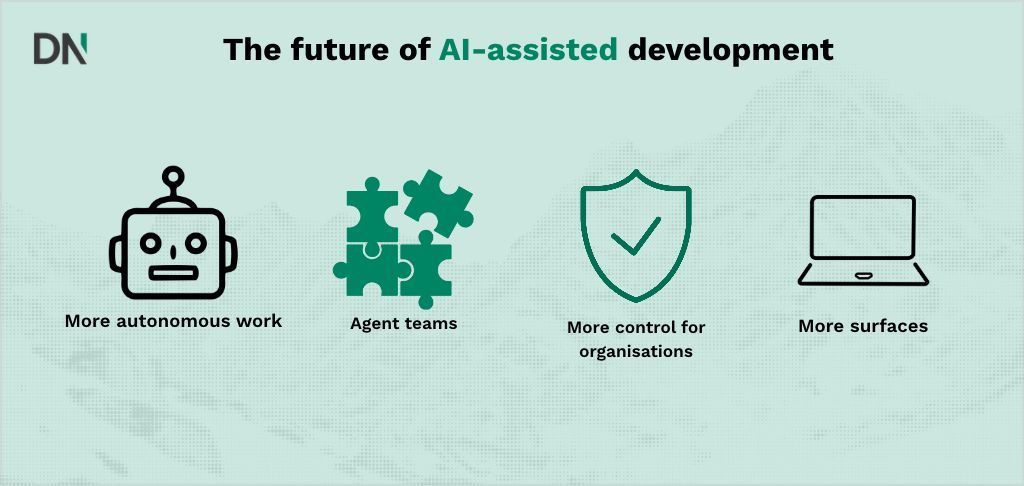
Recent releases point towards longer autonomous tasks, more interfaces and stronger organisational controls. Within twelve months, Claude Code added web and mobile sessions, plugins, skills, agent teams, auto mode, routines and self-hosted environments. Successive models extended autonomous working time. Developers increasingly specify tasks, review results and coordinate agents rather than write every line themselves.
AI skills become a hiring requirement
Gartner predicts that 75% of hiring processes will include workplace AI proficiency certifications and testing by 2027. Teams gain most when they address concrete business problems, invest in training and build security in from the start.
How DataNorth can help
Successful adoption requires more than installing the tool. Our Claude Code Workshop teaches effective, safe agentic development. An AI Assessment identifies valuable opportunities, Live Demos show what teams can achieve, and AI Development and Implementation delivers solutions for your technical challenges.
Frequently asked questions
What is Claude Code?
It is Anthropic’s agentic coding assistant for terminals, VS Code, JetBrains, the Claude desktop app, browsers and mobile. It reads relevant files, edits code, runs commands and tests, and completes multi-step tasks from plain-language instructions.
Is Claude Code free?
The source requires a paid plan, starting with Pro at 20 dollars monthly, or Claude Console API credits. It states that the free Claude plan excludes Claude Code.
Which models can Claude Code use?
The source lists Opus 5, Sonnet 5, Haiku 4.5 and Fable 5.1. Its September 2026 documentation gives Pro and Team Standard a Sonnet 5 default, with Opus 5 for Max, Team Premium, Enterprise and API. Provider and administrator settings can affect defaults; /model changes the selection.
Is Claude Code better than GitHub Copilot?
The task determines the fit. Claude Code suits multi-step repository work and terminal workflows. Copilot has a lower entry price, multiple model providers and deep GitHub integration. Many teams use both.
Does Claude Code run locally or on Anthropic’s servers?
Both. Terminal and IDE sessions run on your machine; cloud sessions use Anthropic’s infrastructure or self-hosted environments. Prompts and relevant code still go to a model via Anthropic, a supported provider or a gateway. Models do not run on your hardware, preventing fully offline use.
Is Claude Code GDPR compliant?
Compliance depends on your configuration and contracts. The source describes commercial plans as excluding training on customer data, retaining Claude Code data for 30 days by default and including a data processing addendum. AWS, Google Cloud and Azure deployments follow their provider’s terms. A commercial plan is recommended over Pro or Max for company code containing personal data.
Originally published by Jorick van Weelie at DataNorth.
Comments
Join the discussionNo comments yet. Be the first to comment.