A beginner’s guide to building your own LLM application
Large Language Models have changed how we interact with technology, enabling computers to understand and generate human-like text.
Building an LLM application might sound like a project reserved for large organizations with extensive resources. Training a model from scratch does demand substantial resources, but building an application that uses an LLM is now much more accessible to beginners.
Even for most complex applications, you don’t need to train a model from the ground up. Using a pre-trained model, or fine-tuning one for your needs, is often a more practical and resource-efficient approach.
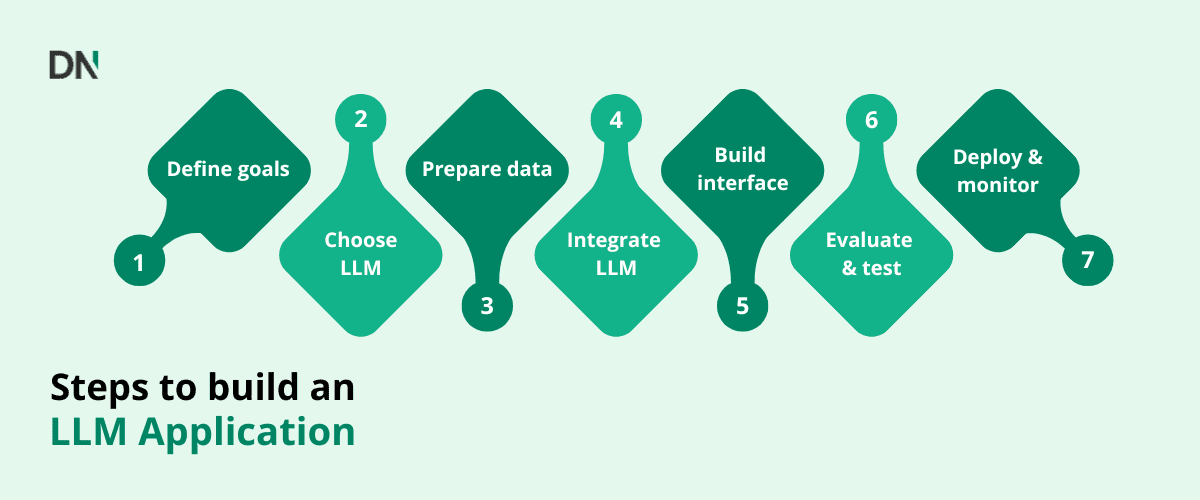
Step 1: Define your goals and use case
Start by deciding what you want your LLM to do. What purpose will your application serve? Which complex tasks should the model help with?
These goals will guide later decisions, including which LLM to choose and what high-quality data you might need.
Step 2: Choose an LLM
Once you’ve defined your application’s purpose, you have three main options for powering it:
- Use a pre-trained model: This is the simplest and most cost-effective option. You use a model already trained on a large, general dataset for inference, or making predictions, without further training. Because no additional learning takes place, this approach requires the least computation and data.
- Fine-tune a pre-trained model: Start with an existing model and train it further on a smaller dataset relevant to your use case. Fine-tuning helps the model become highly proficient at a specialized task or within a particular domain. It requires more computation than using a model unchanged, but significantly less than training from scratch.
- Train a model from scratch: This is generally not recommended for most applications. Building an LLM from the ground up begins with randomly initialized weights and requires enormous amounts of data and computing power, with many potential pitfalls. Pre-trained models are almost always the starting point for fine-tuning because their foundation of general knowledge saves substantial resources and effort.
Note: Platforms such as Hugging Face offer a wide range of open source pre-trained models and fine-tuning tools. Libraries such as PyTorch and TensorFlow provide extensive tools for working with these models.
Step 3: Prepare your data
Your choice of LLM strategy determines the data preparation you need.
For fine-tuning, gather a dataset specific to your task or domain. Its quality is crucial to performance. Preparation involves collecting relevant text, cleaning it and, where needed, formatting or annotating it.
When using a pre-trained model, you still need to consider the input your application sends it. Relevant, well-formatted data helps the transformer architecture process the information effectively.
Step 4: Integrate the LLM
With your model selected or prepared, connect it to your application. This often means setting up an API.
Many model providers offer APIs for accessing their LLMs. For a fine-tuned open source model, you would set up an API endpoint to serve it. With pre-trained models, the designated provider usually supplies the endpoint. Your application sends requests to the API, which returns the model’s response.
Step 5: Build the application interface
Next, create the user interface. Decide how people will submit input to the LLM and how they will see its output.
For a chatbot, for example, you need a text input field and an area displaying the conversation. Your application code takes the user’s input, sends it to the model through the API, receives the response and displays it.
Step 6: Evaluate and test
Once the application is assembled, test it thoroughly to check that the LLM performs as expected for your use case.
Use realistic inputs and assess whether the outputs are accurate, relevant and helpful. Applications for a particular domain may need evaluation criteria specific to that domain. You can use evaluation datasets or ask people to assess response quality, especially for open-ended tasks.
Step 7: Deploy and monitor
The final step is making your application available to users and keeping it working correctly over time.
Deployment involves hosting the application and LLM on servers, often through cloud platforms such as AWS, Google Cloud or Azure, which provide scalable resources.
Monitor the application continuously to track performance and model behaviour, identify performance issues and catch unexpected outputs. Periodically updating or retraining the model with new data can help keep it relevant and performing well.
Challenges when building your own LLM
Computational costs: API use and fine-tuning consume computing resources and incur costs, particularly at scale.
Data privacy: If your application handles sensitive data, both the application and the LLM must comply with privacy regulations.
Debugging: Getting the model to behave as intended can take experimentation, especially when fine-tuning or engineering prompts.
Conclusion
You don’t need a large team or an extensive AI background to build an LLM app today. Clear goals, quality data and the right tools can help you develop powerful applications using modern LLMs.
Ready to build your own private LLM, or looking for expert guidance through the process? Contact us today!
Originally published by Nick Moesker, DataNorth*, on* 30 June 2025*:* Building your own LLM application: A beginners guide.
Comments
Join the discussionNo comments yet. Be the first to comment.